Shopify data sync
Discount Magic keeps its own copy of your Shopify products, orders, customers and discounts, and keeps it in sync with your store automatically.
Last updated 5 days ago
Discount Magic keeps its own copy of the Shopify data it works with, such as your products, orders, customers and discounts, and keeps it in sync with your store automatically.
Which plans include Shopify data sync
How Discount Magic keeps in sync with Shopify
Changes arrive within a minute. When a product, order, customer or discount is created, edited or deleted in Shopify, Shopify notifies Discount Magic, and the change usually shows up in the app within a minute.
Regular checks catch missed changes. Discount Magic also checks its copy against Shopify every hour, and some kinds of data once a day, and fixes any changes that were missed.
Changes you make in Discount Magic go straight to Shopify. When you create or edit a discount or its codes in Discount Magic, the change is sent to Shopify straight away.
When you first install Discount Magic, it imports your existing data from Shopify. This can take from a few minutes to a few hours for a large store, and you can use the app while it runs.
The Data sync page
The Data sync page shows how up to date each kind of data is. To open it, go to Settings in Discount Magic and click Data sync. Its Shopify data table lists each kind of data Discount Magic keeps in sync, in the order a sync runs:
Customer segments
Customers
Products and stock
Collections
Discounts and codes
Orders
Store settings, such as your store's currency and time zone
For each one you can see:
The number of records, under its name: how many Discount Magic has, compared with how many Shopify has, for example 97 of 97.
Status: whether it is up to date. See Statuses below.
Last received: when Shopify last sent a change to Discount Magic, and how many changes it sent in the last 24 hours.
Last sent: when Discount Magic last sent a change to Shopify. Discount Magic only sends changes to your discounts and their codes, so the other rows show a dash.
Last synced: when Discount Magic last checked that kind of data against Shopify, and whether that happens hourly or daily.
Under the table, Sync history lists every sync from the last 7 days: the hourly and daily checks, any re-syncs, and what each one checked. Use the Data filter to see only the syncs that covered one kind of data, for example products.
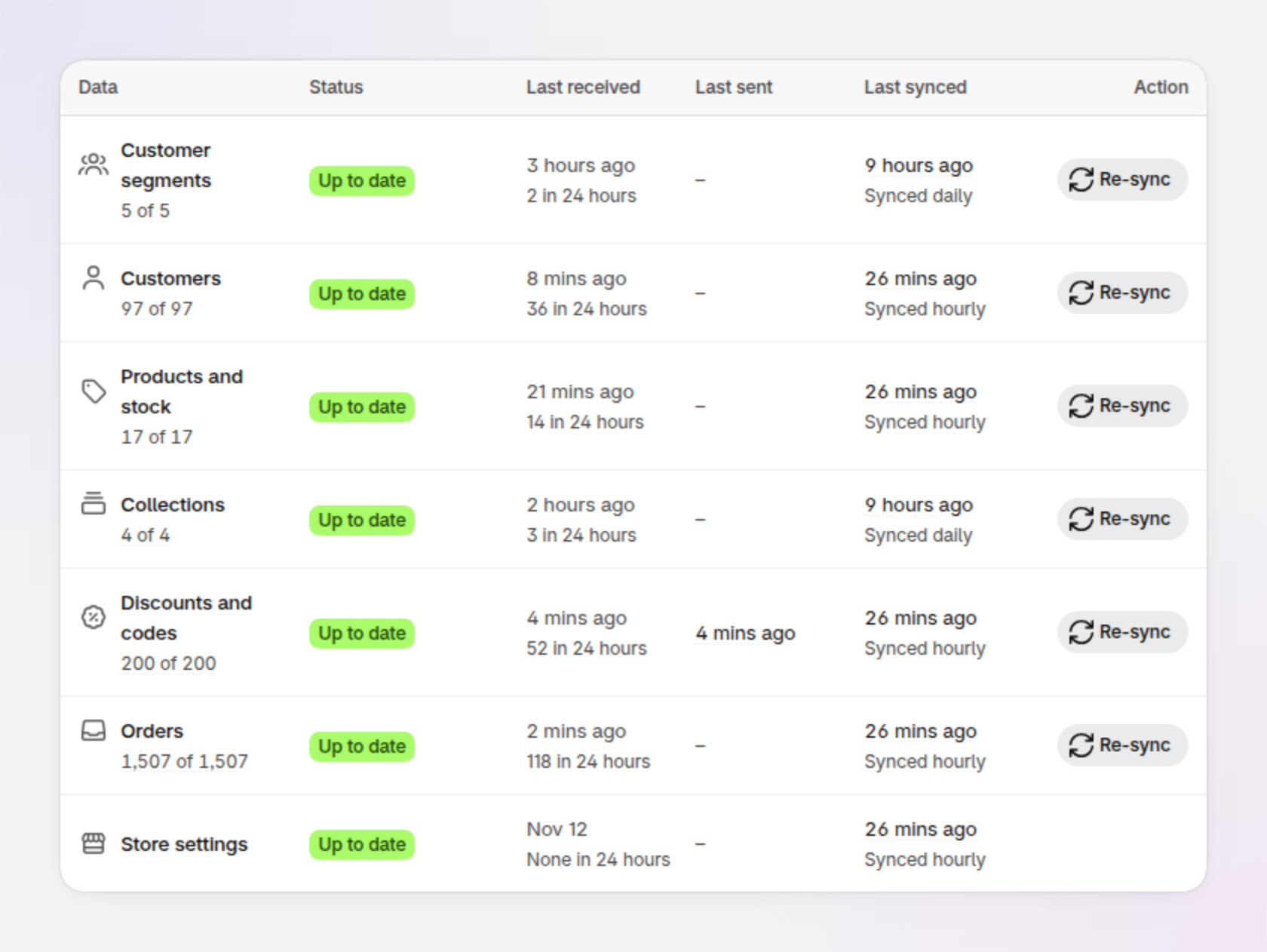
An example of the Shopify data table on the Data sync page.
Data sync statuses
Up to date
Discount Magic has everything Shopify has sent. No action needed.
Syncing or Waiting
A sync is running. Syncing shows its progress, and Waiting means that kind of data is next in line. No action needed. You can leave the page; the sync carries on in the background.
Queued or Updating
Some recent changes from Shopify are waiting to be saved, usually because a lot changed at once, such as a bulk edit. They normally arrive within a few minutes. No action needed.
Importing
A large amount of data is being imported from Shopify, for example during the first import after installing, or after a very large bulk change in your store. The status shows progress and the time left. No action needed.
Delayed
Updates have stopped arriving for longer than expected. Discount Magic retries automatically. If the row still shows Delayed after an hour, contact us.
Out of sync
Discount Magic has a different number of records from Shopify. The next scheduled check usually resolves this. If it doesn't, click Re-sync on that row.
Needs permission
Discount Magic doesn't have permission to read this data in your store, so changes to it can't come through. Click the status to see which permission is missing, then click Review permissions. Only the store owner or a staff member who manages apps can grant it.
How to re-sync with Shopify
You shouldn't normally need to re-sync, because Discount Magic keeps itself in sync. If something looks wrong, for example a product you just created isn't in the app after a few minutes, you can:
Click Re-sync on a row to re-sync just that kind of data.
Click Re-sync all to re-sync everything.
A re-sync runs in the background, and you can follow its progress in the table or in Background tasks. Your data stays available while it runs, and re-syncing never deletes or duplicates anything in Shopify.
One sync runs at a time. After you re-sync a kind of data, you can re-sync it again after 5 minutes.
Frequently asked questions
How quickly do changes in Shopify show up in Discount Magic?
Usually within a minute. If a lot changes at once, such as a bulk product edit or an import, it can take a few minutes, and the Data sync page shows the progress.
I can't find a product, order or customer in Discount Magic. What should I do?
Wait a minute or two if you've only just created it in Shopify. Then, on the Data sync page, check the row for that kind of data, such as Products and stock. If the status is Up to date and it still isn't there, click Re-sync on that row. If it still doesn't appear, contact us.
Why does Last received say hours or days ago?
Last received is when Shopify last sent a change to Discount Magic, so it only moves when something actually changes in your store. Store settings, for example, may not change for days. Last synced is when Discount Magic last confirmed its copy matches Shopify, which happens every hour or every day. If Last synced is recent and the status is Up to date, your data is up to date, however long ago the last change was.
What does "not saved" mean under Last sent?
Shopify didn't accept a change you made to a discount in Discount Magic, so that change isn't in Shopify yet. In Discount Magic, go to Discounts and click the discount's title to see why, fix it if needed, and save it again. Sending means a change is still on its way to Shopify, which usually takes a few seconds.
Why do the record counts not match Shopify?
Counts can differ for a moment while changes are arriving. If the row shows Out of sync for more than an hour, click Re-sync on that row. For very large stores, Shopify sometimes gives an approximate count, shown with a + (for example 10,000+), so no comparison is made.
Why do some kinds of data say "Synced daily"?
Customer segments and collections are checked against Shopify once a day rather than every hour. Changes you make to them in Shopify still arrive within a minute, as they do for everything else.
Why is the Re-sync button greyed out?
Either a sync is already running, or you re-synced that kind of data in the last 5 minutes. Hover over the button to see which, and when you can re-sync again.
Does re-syncing change anything in my Shopify store?
No. A re-sync only reads from Shopify and updates Discount Magic's copy. It doesn't change, delete or duplicate anything in your store.
Do I need to keep the page open during a re-sync?
No. Syncs run in the background. You can leave the page or close Shopify, and the sync carries on.
Is my data safe?
Discount Magic only reads the data it needs for its features, and only with the permissions you approved when installing. To read our privacy policy, go to Settings in Discount Magic and click Legal.
Getting more help with data sync
If something still looks wrong after a re-sync, send us a message from the Help menu in Discount Magic and tell us which kind of data is affected and what you expected to see.
Related articles
Was this helpful?
Still need help? Ask the team