Klaviyo sync
Send unique Shopify discount codes from Discount Magic to a Klaviyo coupon, so each person gets their own code in your emails and flows.
Last updated 5 days ago
Discount Magic can send the unique codes in a batch to a coupon in Klaviyo. Klaviyo then gives each person their own code in your campaigns and flows, using a template tag in the email. Discount Magic can also send Klaviyo a redemption event when a customer uses one of those codes, so you can segment and trigger flows on redemptions.
Which plans include Klaviyo sync
Why sync codes from Discount Magic
Klaviyo can create simple Shopify codes by itself. Syncing from Discount Magic helps when you need more than simple codes:
Any kind of Shopify discount: Klaviyo's own codes cover percentage, fixed amount and free shipping offers. With Discount Magic you can send codes for any discount you can build in Shopify, such as buy X get Y, subscription offers, discounts for a customer segment, a minimum quantity or your own usage limits.
Your own code format: codes follow the code format you choose, such as
WELCOME-7K2P.Fast, and for codes you already have: you can sync any batch, including one you made earlier or pasted or uploaded. Tens of thousands of codes reach Klaviyo in minutes.
Kept up to date: codes you add to a synced batch are sent to Klaviyo automatically, and codes you delete are removed from Klaviyo.
Redemption tracking: Klaviyo doesn't track code redemptions. Discount Magic sends a redemption event to the customer's Klaviyo profile, so you can build segments and trigger flows on redemptions. Turn on redemption events in Discount Magic's Klaviyo settings.
One discount, many channels: the same discount can have a batch for Klaviyo and other batches for print, partners or staff, each with its own results.
How to connect your Klaviyo account
Approve access in Klaviyo
Log in to Klaviyo if asked, choose the account and approve access. Discount Magic asks to read your account name, and to read and create coupons and coupon codes.
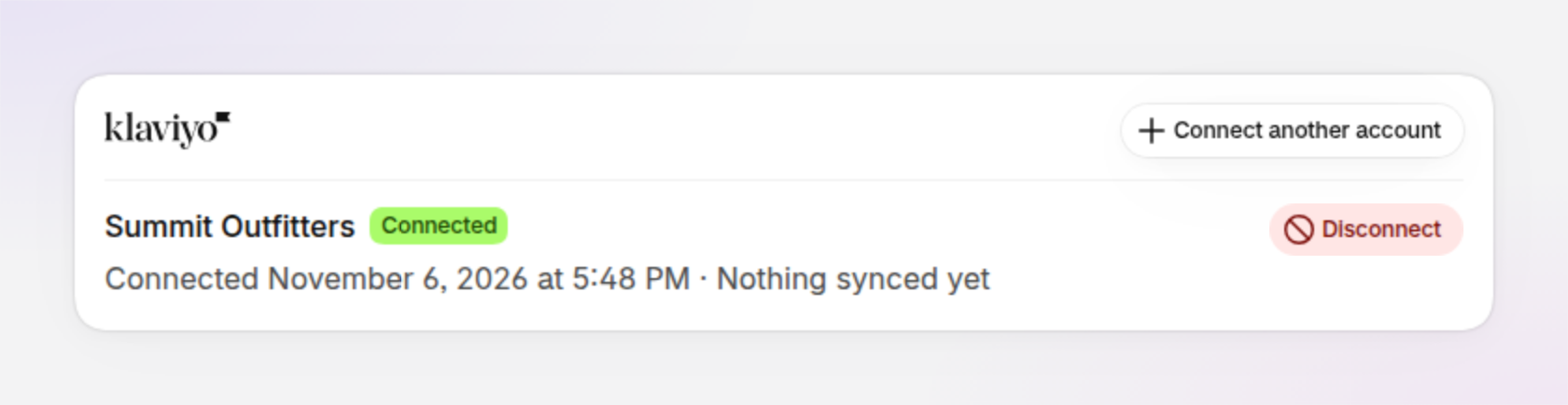
If you decline access in Klaviyo, Discount Magic shows Klaviyo connection failed and "Access was declined in Klaviyo. Connect again when you're ready."
Connect more than one account
You can connect several Klaviyo accounts, for example a test account and your live account. Click Connect another account and approve access for the other account. Connecting an account that is already listed updates it rather than adding it twice.
Account statuses
Connected: the account is ready to sync.
Reconnect required: access has expired or was removed in Klaviyo. Click Connect another account and approve the same account again to resume syncing.
Disconnecting: Discount Magic is removing synced codes from Klaviyo before it disconnects. See How to disconnect a Klaviyo account.
Error: something went wrong with the connection. The reason is shown under the account name.
How to sync a batch to a Klaviyo coupon
A Klaviyo coupon is the pool of codes your campaigns and flows draw from. You can sync a batch into a new coupon, or into one you already have.
Open the batch
In Discount Magic, go to Discounts and click the discount's title. In the Discount code batches section, click the batch.
Open the Klaviyo tab
Click the Klaviyo tab above the codes. A batch that hasn't been synced shows Not synced to Klaviyo yet. Click Sync to Klaviyo.
Choose the account and coupon
The Sync to a Klaviyo coupon window opens. If you've connected more than one account, choose the Klaviyo account. Then, under Coupon, pick an existing coupon or Create new coupon.
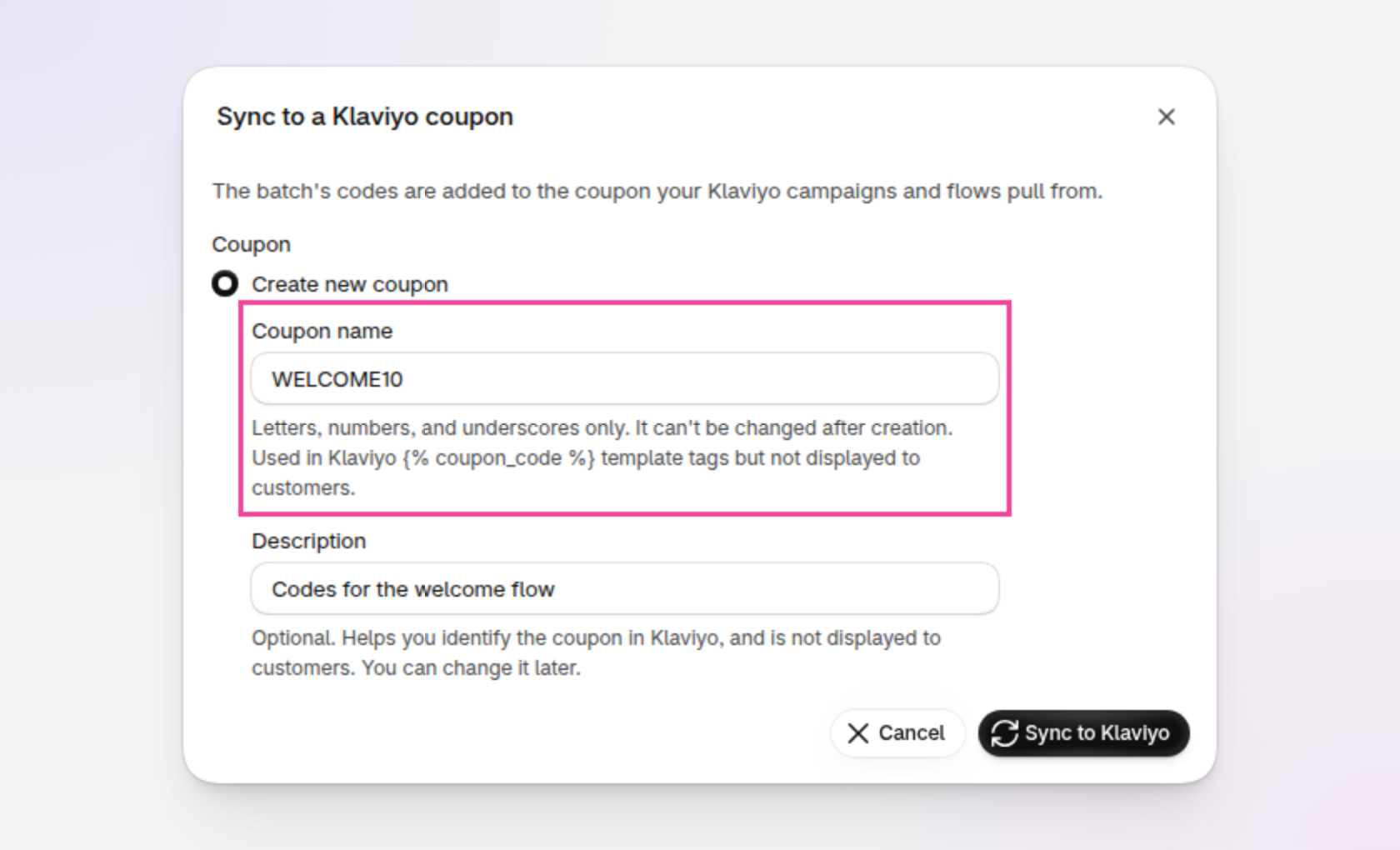
An example of the Sync to a Klaviyo coupon window, with Coupon name outlined.
For a new coupon, enter a Coupon name, such as WELCOME10. It can use letters, numbers and underscores, up to 60 characters. Customers never see the coupon name: it's the name you use in the template tag. The coupon name can't be changed after the coupon is created. You can also add an optional Description to help you find the coupon in Klaviyo.
You can also sync a new batch straight after you create it: on the finished screen, under Share & export, choose Sync to Klaviyo.
Klaviyo takes about 90 seconds for every 20,000 codes. For a campaign, sync the batch well before you send, and make sure it holds at least one code for every recipient.
Sync statuses
Once a batch is synced, the Klaviyo tab lists each coupon it's linked to, with its Status, Codes and Last synced time.
Syncing: codes are being sent to Klaviyo.
Synced: every code is in the coupon.
Partially synced: most codes are in the coupon, but Klaviyo didn't accept some. Click Retry in the coupon's actions menu (⋯) to send the missing ones.
Sync failed: the sync couldn't finish. The banner Some Klaviyo codes need attention gives the reason. Click Retry in the coupon's actions menu.
Removed: the batch's codes were removed from this coupon. Click Sync again in the actions menu to send them back.
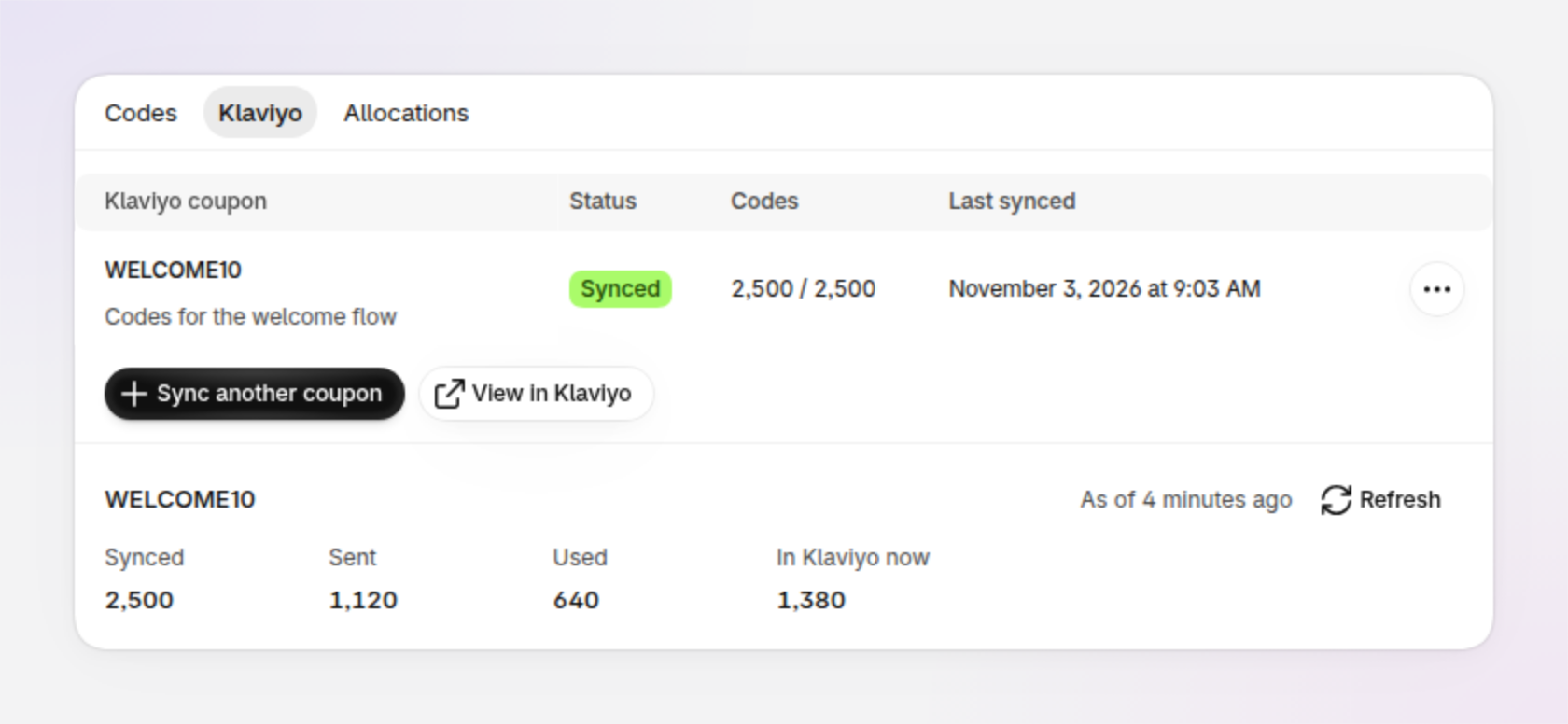
An example of a batch's Klaviyo tab, synced to one coupon.
Sync a batch to more than one coupon
To use the same batch in another coupon or another Klaviyo account, click Sync another coupon. Each coupon gets all of the batch's codes. To open your coupons in Klaviyo, click View in Klaviyo.
A coupon that already holds other codes
If you pick a coupon that already holds codes from another discount, Discount Magic asks This coupon already holds other codes before it syncs. Codes from different discounts in one coupon can give recipients different offers. Click Sync anyway only if you want recipients to get different offers.
How to use the codes in Klaviyo emails and flows
Klaviyo shows a code from the coupon with a template tag named after the coupon, for example:
{% coupon_code 'WELCOME10' %}
Copy the template tag
On the batch's Klaviyo tab, open the coupon's actions menu (⋯) and click Template tag. You can also hover over the coupon name and click the code icon. Click the copy button beside the Klaviyo template tag.
Each recipient gets a different code from the coupon, and Klaviyo doesn't send the same code twice. If a coupon runs out, Klaviyo skips any recipient it has no code for. For a flow that keeps sending, add codes when the batch runs low, or turn on auto-replenish to do it for you.
Codes Klaviyo has sent, and codes in Klaviyo
Klaviyo doesn't tell other apps when it sends a code, so Discount Magic checks each synced coupon's unsent codes in Klaviyo about every 5 minutes. When Klaviyo has sent a code to someone, Discount Magic records it as allocated to that coupon, whether or not the batch uses auto-replenish. A coupon that hasn't sent a code for a day is checked about every 6 hours instead, until it sends again.
A synced code that Klaviyo hasn't sent yet, and that hasn't expired, shows as In Klaviyo. Klaviyo could send an In Klaviyo code at any moment, so Discount Magic keeps it for Klaviyo:
You can't allocate an In Klaviyo code manually. Allocating the next codes from a batch skips it, and choosing it directly is refused with "That code is in Klaviyo, which hands it out".
A download of unallocated codes leaves In Klaviyo codes out.
The batch counts In Klaviyo codes separately from unallocated codes: the codes list shows an In Klaviyo chip under Given to, the Allocation filter has an In Klaviyo option, and the Allocations tab and the Allocation section on the right of the batch's page say how many are in Klaviyo.
A code stops being In Klaviyo when Klaviyo sends it (it's then allocated to the coupon), when it expires, or when you remove the batch's codes from Klaviyo.
See how a coupon's codes are doing
On the batch's Klaviyo tab, below the coupon table, each coupon the batch is synced to has its own counts, headed with the coupon's name. The counts cover only this batch's codes on that coupon:
Synced: the codes that reached the Klaviyo coupon.
Sent: of those, the codes Klaviyo has sent to someone.
Used: synced codes used at checkout at least once.
In Klaviyo now: the codes Klaviyo still holds and can still send.
A line beside the heading says when the coupon was last checked in Klaviyo, or "Not checked in Klaviyo yet" before the first check. The counts come from Discount Magic's regular checks, so opening the page is quick. If the counts are out of date, Discount Magic checks again in the background, and the counts update automatically while the page is open.
To check straight away, click Refresh on the coupon's counts. You can refresh each coupon once a minute.
On the free plan, Discount Magic doesn't record which codes Klaviyo sends, so you see Synced and Used only. Sent shows Needs Pro, and there's no In Klaviyo now count or Refresh button.
Expiry dates on codes in Klaviyo
A discount with an end date: each code is sent to Klaviyo with the discount's end date as its expiry, so Klaviyo stops sending it when the discount ends.
A discount with no end date: Klaviyo gives each code an expiry one year after it was synced.
Changing the end date later: codes in Klaviyo that haven't been sent yet move to the new date, and codes you add afterwards use it too. Codes Klaviyo has already sent keep the expiry they had.
Off the Pro plan: codes in Klaviyo keep the expiry they had, because Discount Magic doesn't update expiry dates while your store is off the Pro plan. When your store is back on Pro, unsent codes update to the current end date automatically.
Shopify still decides at checkout. A code works as long as the discount is active, whatever its expiry in Klaviyo.
How to remove codes from Klaviyo
Klaviyo doesn't let anyone remove a code it has already sent to someone. Everywhere below, codes already sent to recipients stay in Klaviyo, and only unused codes are removed. The coupon itself always stays in Klaviyo.
Remove a batch from a coupon
On the batch's Klaviyo tab, open the coupon's actions menu (⋯) and click Remove. In Remove this batch from Klaviyo?, click Remove from Klaviyo. Campaigns and flows stop sending the batch's codes. The codes stay in Discount Magic and Shopify, and you can sync the batch again at any time.
Delete codes, a batch or a discount
When you delete codes, a batch or a whole discount, in Discount Magic or in Shopify, Discount Magic removes the unused codes from Klaviyo too. You don't need to do anything in Klaviyo.
Deactivate a discount
When a discount with synced codes is deactivated, its page shows Codes in Klaviyo will stop working. You can leave the codes in Klaviyo for when you reactivate the discount, or click Pull unused codes from Klaviyo, then Pull codes, so nobody is sent a code that won't work. If you reactivate the discount later, sync its batches again from their batch pages.
If some codes couldn't be removed, the page shows Some codes weren't removed from Klaviyo. Try again from the discount's page: only the codes still in Klaviyo are retried.
How to disconnect a Klaviyo account
Disconnecting stops syncing for that account only. Other connected Klaviyo accounts aren't affected.
If you chose to remove codes first, the account shows Disconnecting while Discount Magic removes them, which can take a while for large coupons. You can leave the page, or click Disconnect again to skip the rest of the cleanup.
Uninstalling Discount Magic disconnects every Klaviyo account. Synced codes stay in Klaviyo.
Redemption events in Klaviyo
Klaviyo doesn't track code redemptions on its own. Discount Magic can record a Redeemed Discount Code event on the customer's Klaviyo profile when they use a code from a batch you've synced. The event is off until you turn it on.
You can use it to:
Send reminders: a flow for recipients who haven't redeemed their code yet, such as before it expires.
Follow up after a purchase: a thank-you or cross-sell flow triggered by the redemption.
Build segments by batch: everyone who redeemed a code from one batch, or everyone who didn't.
Turn on redemption events
Events are sent for orders placed after you turn the event on. Earlier orders aren't sent. Each event reaches Klaviyo a few minutes after the order, usually 2 to 4, and carries the order's own time. If you turn the event off, events that haven't been sent yet are dropped.
Redemption events are part of the Pro plan. On the free plan, each switch shows a Pro badge, and turning it on explains what Pro includes. If your store leaves the Pro plan, a switch that was on says "Paused: Klaviyo events are part of Pro." and nothing is sent until you're back on Pro. Your settings are kept, and events then start again for orders placed from that point.
If an account says "Connected before Discount Magic could send events. Reconnect this account to allow them.", click Reconnect and approve access in Klaviyo. Discount Magic needs permission to send events, which accounts connected earlier didn't give.
Redemption event properties
The event carries the properties below, which you can use in flow filters and segments. It also carries the order total as Klaviyo revenue. If one order uses more than one synced code, Klaviyo counts that revenue once, on one of the events, while Order Value appears on every event.
Add your own properties to a batch
You can add up to 10 properties of your own to a synced batch, such as Channel set to Instagram. On the batch's page, in the Klaviyo event properties section on the right, click Add property, enter a name and value, and click Save. Your properties are added to every redemption event for the batch's codes, in every Klaviyo account it syncs to, from then on. Names can't repeat, can't match the properties above and can't start with $.
Which orders are sent
Any order that uses a code from a batch synced to that Klaviyo account, including test, cancelled and refunded orders, as Shopify counts them.
One event per code per order, even if the batch is synced to more than one coupon in the account.
Orders are sent only within 72 hours of being placed. An order Discount Magic learns about later than that isn't sent.
Guest checkouts, and orders from customers whose data has been erased, aren't sent, because there's no customer email to find the profile.
When the event is on, the customer's email address is sent to Klaviyo with it. If Klaviyo doesn't have a profile for that email yet, it creates one. That profile isn't subscribed to your marketing, but Klaviyo counts it toward your active profiles.
Frequently asked questions
Can I use Klaviyo sync on the free plan?
No. Connecting Klaviyo, syncing batches and redemption events are part of the Pro plan. On the free plan, Connect and Sync to Klaviyo show a Pro badge and explain what Pro includes.
What happens to my Klaviyo codes if I leave the Pro plan?
Codes already in Klaviyo keep working, but keep the expiry they had. New syncs, top-ups and redemption events stop until you're back on Pro, and codes Klaviyo sends aren't recorded in Discount Magic. Codes Klaviyo hasn't sent stay In Klaviyo, so none can be given to two people. To free them, remove the codes from Klaviyo. You can still remove codes and disconnect accounts. When you're back on Pro, the codes Klaviyo sent meanwhile are recorded as allocated and expiry dates update to the current end date.
Do I need Discount Magic if Klaviyo can already create codes?
For a simple percentage or fixed amount code in a flow, Klaviyo's own codes may be all you need. Discount Magic helps when you want other discount types, your own code format, the same discount on other channels, or redemption events in Klaviyo.
Can I sync codes I created before connecting Klaviyo?
Yes. You can sync any batch at any time, including batches of pasted or uploaded codes.
What happens when I add codes to a synced batch?
New codes are sent to every coupon the batch is synced to, as soon as they're ready. The Add codes window says so, such as "New codes will automatically sync to Klaviyo WELCOME10". See Adding more codes to a batch.
Why can't I allocate some of my codes?
The codes are In Klaviyo: synced to a coupon and not sent yet, so Klaviyo could send them at any moment. Discount Magic keeps them for Klaviyo so no code goes to two people. To use them elsewhere, remove the batch's codes from Klaviyo first. See Codes Klaviyo has sent, and codes in Klaviyo.
Can I rename a Klaviyo coupon?
No. The coupon name is part of the template tag, so it can't be changed after the coupon is created. You can change its description at any time from the coupon's actions menu, with Update description.
Why are some codes still in Klaviyo after I removed them?
Klaviyo doesn't allow codes it has already sent to recipients to be removed. Only unused codes are removed. The rest still work at checkout while the discount is active.
Does Klaviyo know when a code has been used?
Not by itself. Discount Magic sends a redemption event to Klaviyo when a synced code is used at checkout. Redemption events are off until you turn them on: in Discount Magic, go to Settings, click Klaviyo under Integrations, and turn on Redeemed Discount Code in the Events section.
Can I sync one batch to more than one Klaviyo account?
Yes. Click Sync another coupon on the batch's Klaviyo tab and choose the other account.
What happens when a Klaviyo flow runs out of codes?
Klaviyo skips any recipient it has no code for, without notifying you. Add codes to the batch before it runs out, or turn on auto-replenish to add them automatically.
What if my sync failed?
The batch's Klaviyo tab shows the reason. Click Retry in the coupon's actions menu. A retry sends only the codes that aren't in Klaviyo yet.
Related articles
Was this helpful?
Still need help? Ask the team