Discount code formats
A code format is the pattern Discount Magic follows when it generates unique discount codes, such as your own text followed by random characters.
Last updated 6 days ago
A code format is the pattern Discount Magic follows when it generates unique discount codes for a batch, such as SAVE- followed by four random characters. You choose the code format in the Code format section of the batch designer when you bulk generate unique discount codes.
Which plans include discount code formats
How to start from a preset
Each preset is a starting point that you can then change. The codes below are examples of what each preset might produce.
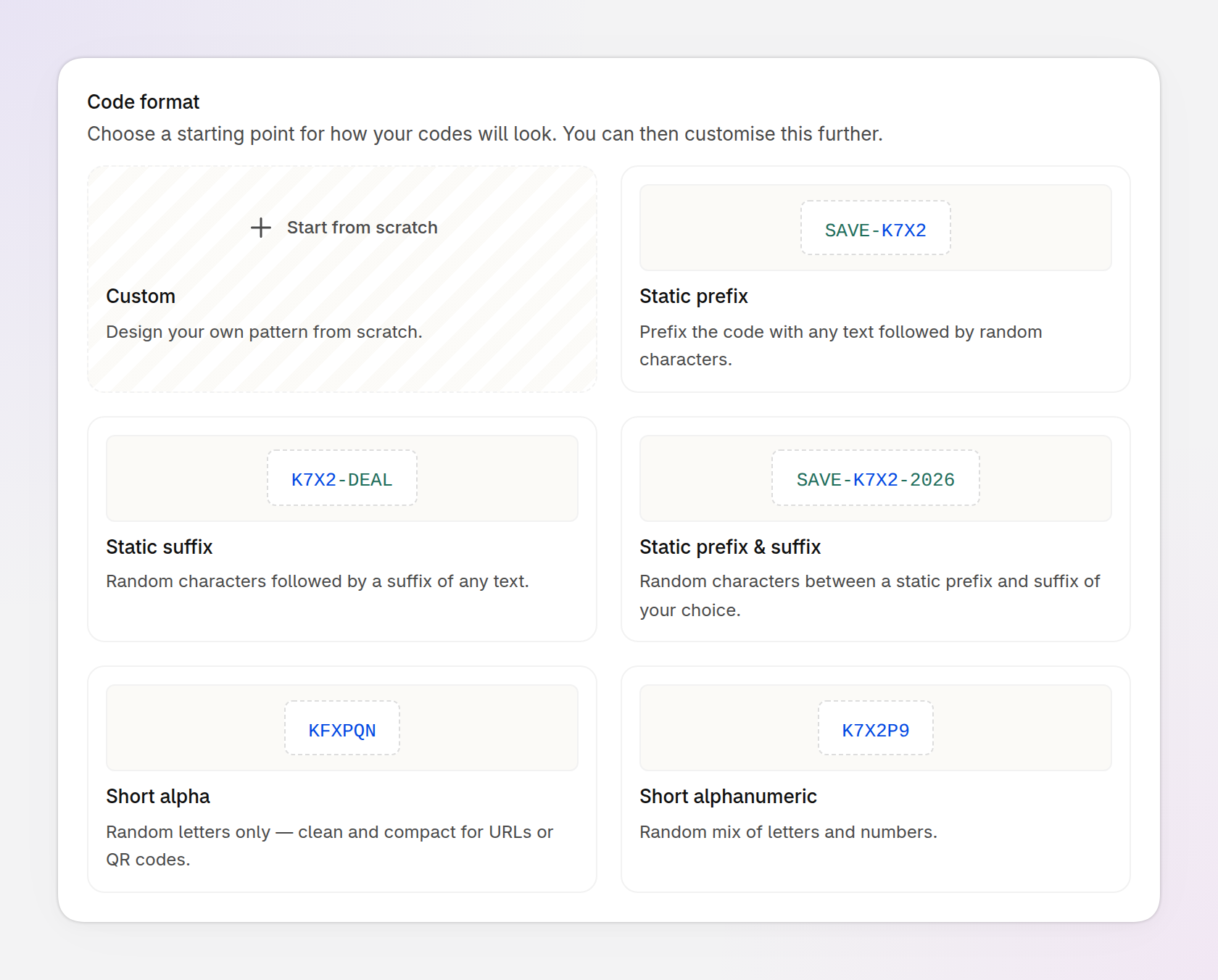
An example of the preset gallery in the Code format section. Only some of the presets are shown.
Parts of a code format
A code format is made of parts joined together. After you pick a preset, Customise format shows its parts. In the example below, the Static prefix preset has two:
1. Prefix: the same text in every code, here
SAVE-.2. Random segment: characters that are different in each code, here four of them.
Click a part to change it, or drag a part to move it to a different position in the code. Click a plus button to add a part: a Random segment or, on the Pro plan, a Prefix, Suffix or Static text. A format needs at least one random segment, because that is what makes each code unique.
Pro plan: a code format can use every kind of part: random segments and custom text, as a prefix, a suffix or static text. On the free plan, a code format can only contain random segments. You can add, move and adjust parts on both plans.
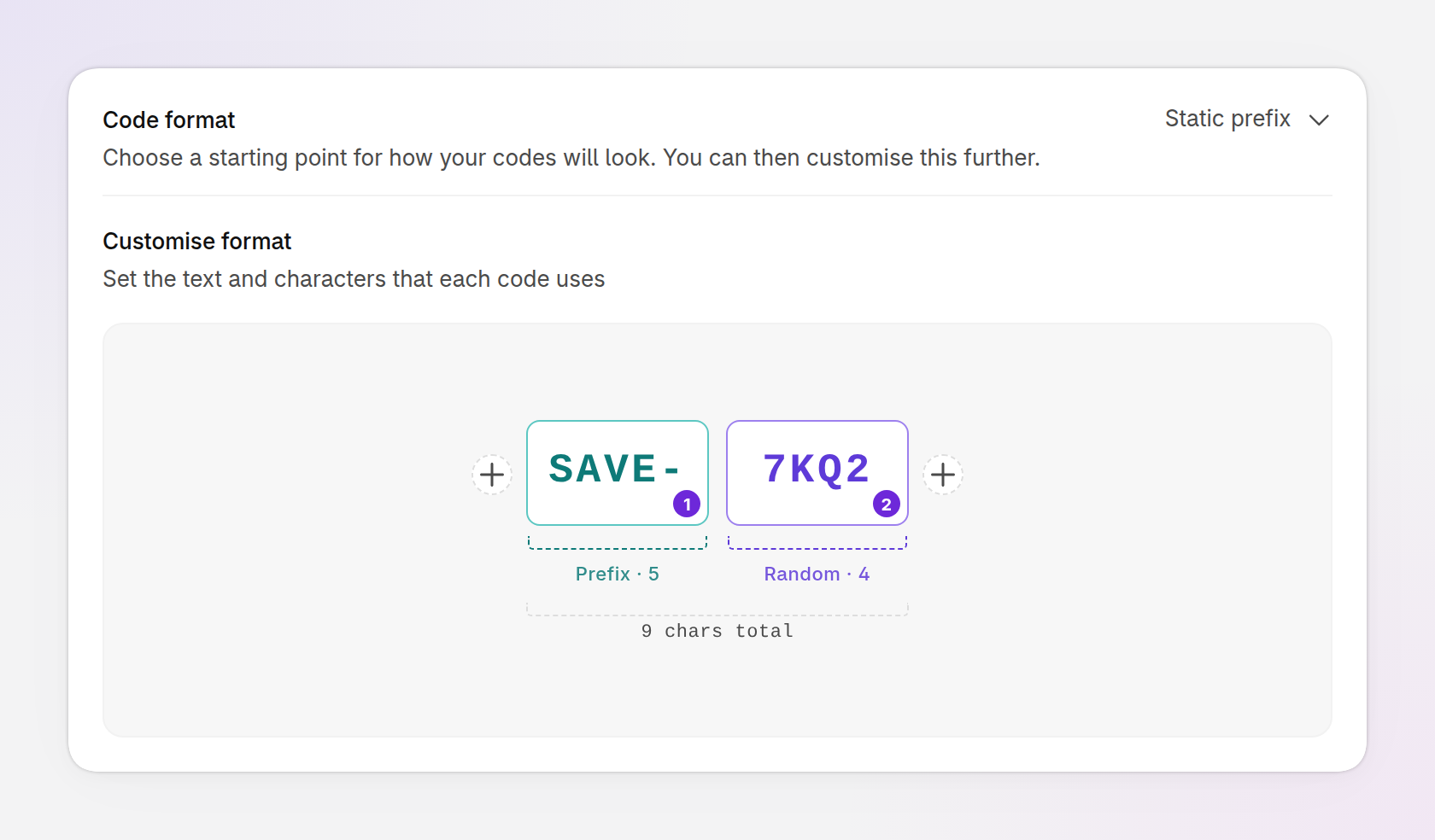
An example of a Static prefix code format in Customise format: a prefix (1) followed by a random segment (2).
Prefix, suffix and static text (Pro plan)
A prefix, suffix or static text part is custom text that you choose, and it is the same in every code in the batch. The three differ only in where the text goes:
Prefix: text at the start of every code, such as
SAVE10-inSAVE10-7KQ2.Suffix: text at the end of every code, such as
-SUMMERin7KQ2-SUMMER.Static text: text between two other parts, such as the hyphen in
K7X-482or the word-SAVE-inKFX-SAVE-482.
Each of these parts can be up to 24 characters long.
Pro plan: you can use every kind of part: random segments, prefixes, suffixes and static text. On the free plan, you can only use random segments.
Ideas for using prefixes, suffixes and static text
When the rest of a code is random, custom text makes it recognizable. For example:
Show the offer: with a prefix such as
SAVE10-, your customer service team can identify a code's offer at a glance.Name an influencer or partner: add their name, such as
ALEX-, to make their codes feel personal.Name a campaign: a prefix or suffix such as
SUMMERSALEshows which campaign a code came from.Name a product: a prefix such as
RED-SHIRT-shows which product a code is for.Use the text in automations: tools such as Shopify Flow and Klaviyo can check the text of a discount code. For example, "if the discount code contains
WELCOME, send the welcome follow-up email".
Random segments
A random segment is the part of the code format that Discount Magic fills with different characters for each code. For each random segment, you choose its length and which characters it uses.
Length has two options:
Fixed: every code has the same number of random characters, up to 24.
Range: the number of random characters varies between a minimum and a maximum that you set, up to 32.
The characters can be any mix of Letters, Numbers and Symbols. You can also click individual characters to leave them out.
Discount Magic creates codes in uppercase. Shopify doesn't treat discount codes as case sensitive, so customers can type them in any case.
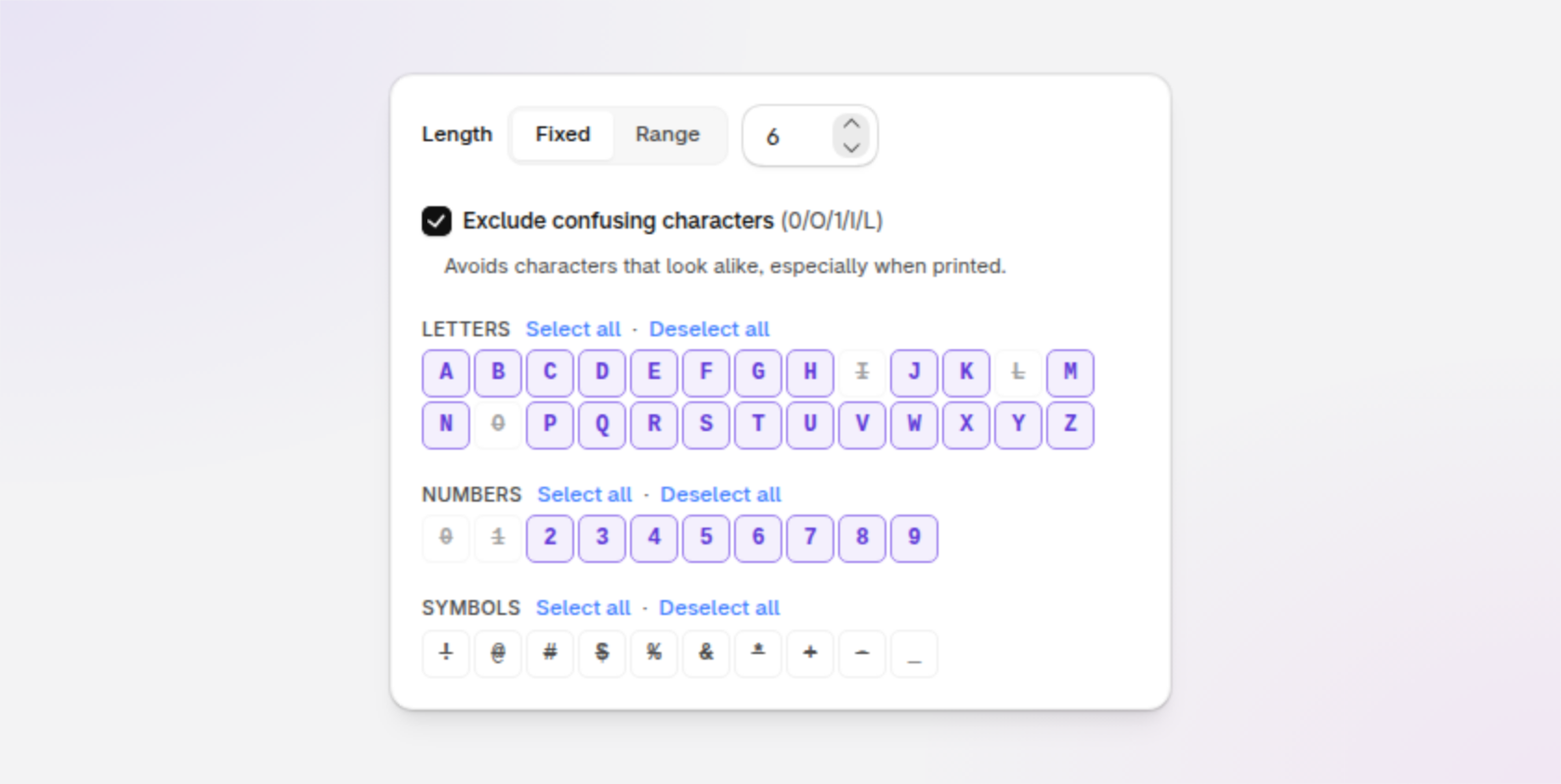
An example of the settings for a random segment: length, confusing characters and which characters to use.
How to exclude confusing characters
Exclude confusing characters leaves out characters that look alike: 0, O, 1, I and L. This helps when codes are printed, handwritten or read aloud. In Discount Magic, Exclude confusing characters is turned on by default in presets that use letters.
Ideas for advanced code formats (Pro plan)
On the Pro plan, you're not limited to a prefix at the start of a code or a suffix at the end. A code format can combine as many parts as you need, in any order, and each random segment has its own length and characters. For example:
Letters, custom text, then numbers:
KFX-SAVE-482. A random segment of letters, static text, then a random segment of numbers.Custom text at both ends:
VIP-7KQ2-2026. A prefix, a random segment, then a suffix.Groups that are easy to read:
7KQ2-M3XP-9NTW. Three random segments with a hyphen between each.A name, then letters, then numbers:
ALEX-KFXP-4829. A prefix, a random segment of letters, a hyphen, then a random segment of numbers.Codes of different lengths:
SAVE-7KQ2orSAVE-7KQ2M3XP. A prefix, then a random segment with a Range length of 4 to 8.
To build a format like these, start from any preset, or from Custom, then add parts and drag them into the order you want.
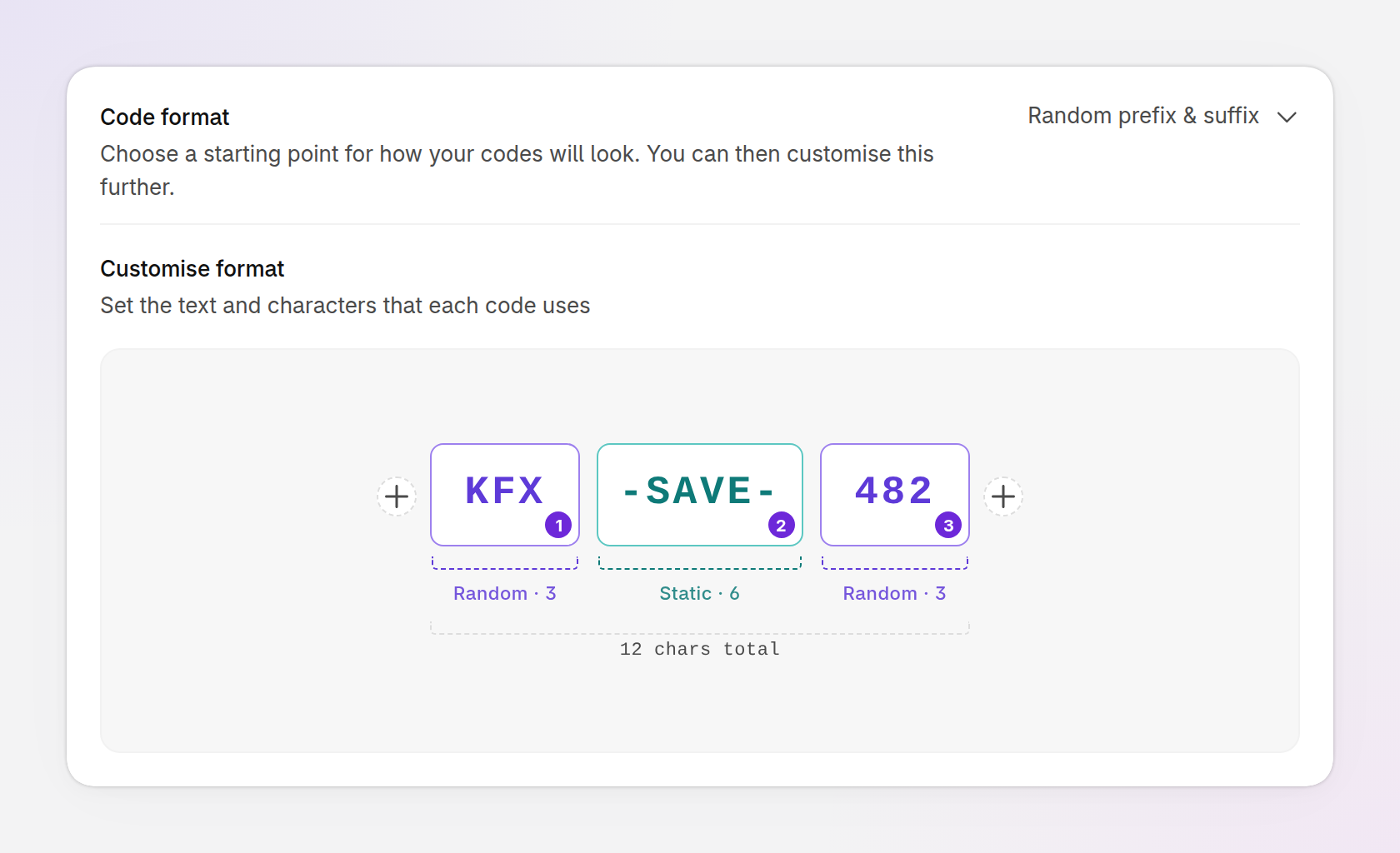
An example of an advanced code format: random letters (1), static text (2), then random numbers (3).
How many codes a format can make
The length and characters of the random segments decide how many different codes a code format can make. For example, 4 random letters and numbers (without confusing characters) can make 923,521 codes, and 6 can make about 887 million. Six random numbers can make only 1,000,000.
A format with far more possible codes than the batch needs is harder to guess and leaves room to add codes later. If a batch would use most of the codes a format can make, Discount Magic shows Consider a longer code format. If there isn't enough room, it shows This code format is nearly full or Not enough possible codes, and you need to change the format before you can generate.
Each extra random character multiplies the number of possible codes, so adding one character is usually the quickest fix.
Discount Magic also checks each generated code against the codes already in your store, so it doesn't create a code your store already has.
Frequently asked questions
How long can a Shopify discount code be?
Shopify allows discount codes of up to 255 characters. In Discount Magic, the whole code format, including any prefix or suffix, has to fit within that limit.
Are Shopify discount codes case sensitive?
No. Shopify treats SAVE-7KQ2 and save-7kq2 as the same code. Discount Magic creates codes in uppercase.
Can I add a prefix or suffix to my discount codes?
Yes, on the Pro plan. In Discount Magic, pick a preset such as Static prefix, or add a Prefix or Suffix part to any code format.
What characters can I use in generated discount codes?
In Discount Magic, random segments can use the letters A to Z, the numbers 0 to 9 and these symbols: ! @ # $ % & * + - _.
Do codes I paste or upload need to follow a code format?
No. Codes you paste or upload (Pro plan) keep the form they already have, so they don't need to match each other.
Related articles
Was this helpful?
Still need help? Ask the team